You are viewing documentation for Cozystack v1.2. For the latest version, see the v1.6 documentation.
Tenant System
Introduction
A tenant in Cozystack is the primary unit of isolation and security, analogous to a Kubernetes namespace but with enhanced scope. Each tenant represents an isolated environment with its own resources, networking, and RBAC (role-based access control). Some cloud providers use the term “projects” for a similar entity.
Cozystack administrators and users create tenants using the
Tenant application
from the application catalog.
Tenants can be created via the Cozystack dashboard (UI), kubectl, or directly via Cozystack API.
Tenant Nesting
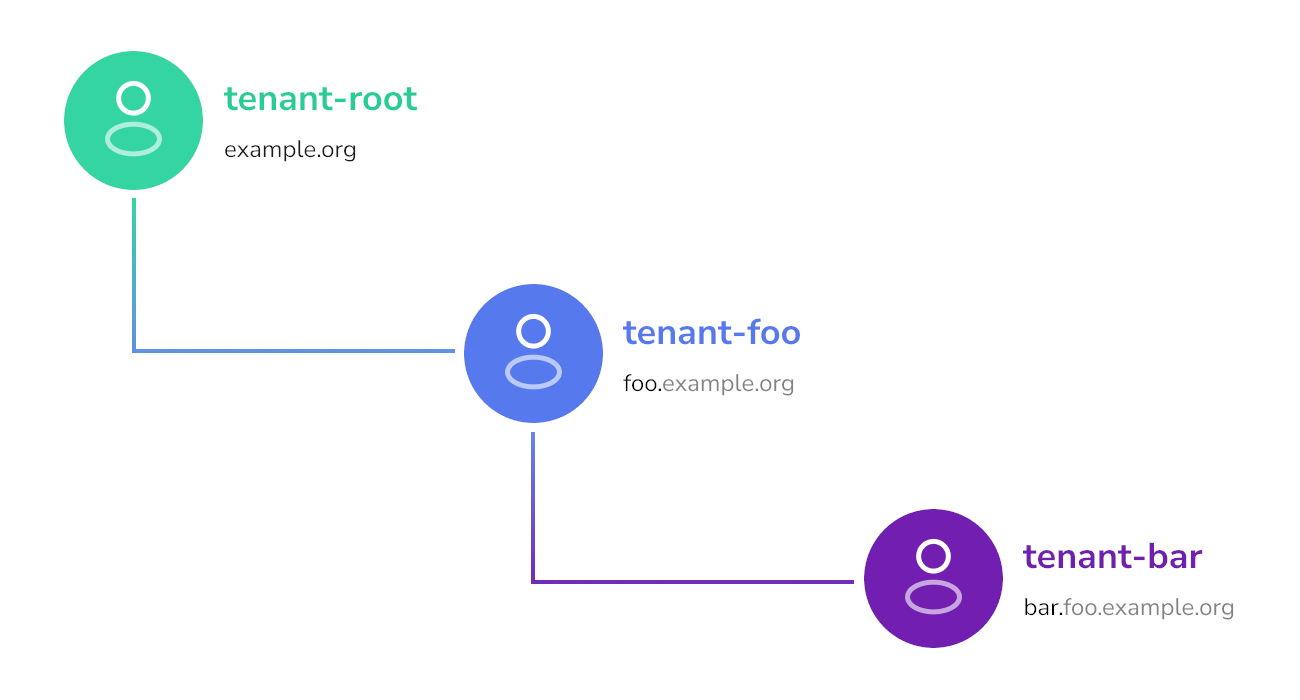
All user tenants belong to the base root tenant.
This root tenant is used only to deploy user tenants and system components.
All user-side applications are deployed in their respective tenants.
Tenants can be nested further: an administrator of a tenant can create sub-tenants as applications in the Cozystack catalog. Parent tenants can share their resources with their children and oversee their applications. In turn, children can use their parent’s services.
Sharing Cluster Services
Tenants may have cluster services deployed in them. Cluster services are middleware services providing core functionality to the tenants and user-facing applications.
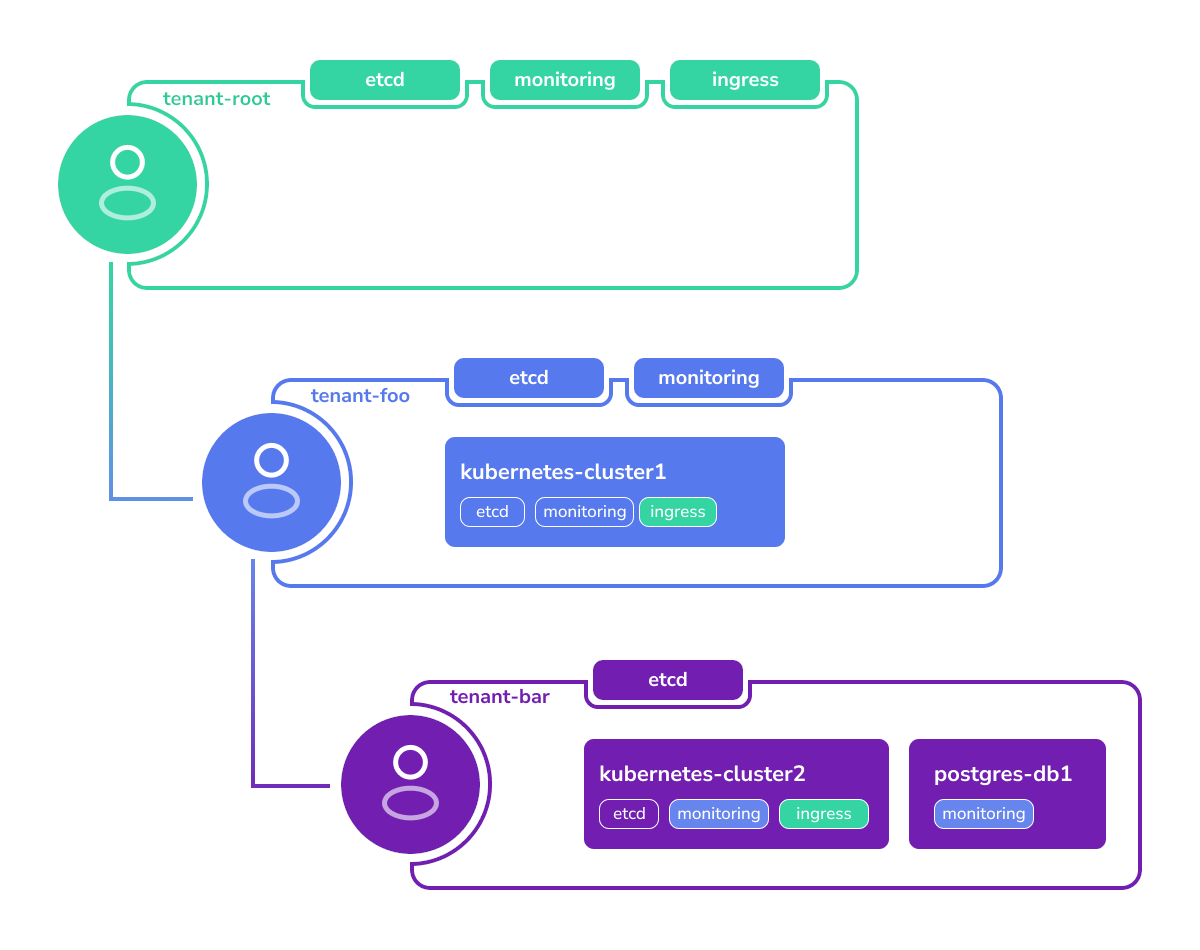
The root tenant has a set of services like etcd, ingress, and monitoring by default.
Lower-level tenants can run their own cluster services or access ones of their parent.
For example, a Cozystack user creates the following tenants and services:
- Tenant
fooinside of tenantroot, having its own instances ofetcdandmonitoringrunning. - Tenant
barinside of tenantfoo, having its own instance ofetcd. - Tenant Kubernetes cluster and a
Postgres database in the tenant
bar.
All applications need services like ingress and monitoring.
Since tenant bar does not have these services, the applications will use the parent tenant’s services.
Here’s how this configuration will be resolved:
- The tenant Kubernetes cluster will store its data in the
bartenant’s ownetcdservice. - All metrics will be collected in the monitoring stack of the parent tenant
foo. - Access to the applications will be through the common
ingressdeployed in the tenantroot.
Network Isolation Between Tenants
Every tenant namespace is isolated from its siblings by Cilium network
policies installed automatically by the tenant chart. There is no
per-tenant opt-out: the previous isolated field was removed in
Cozystack v1.0. Pods inside a tenant namespace also cannot reach
kube-apiserver by default, or the tenant’s own etcd when the tenant
was created with etcd: true — they need to opt in with one of two pod
labels:
policy.cozystack.io/allow-to-apiserver: "true"— reach the in-cluster Kubernetes API (for operators, dashboards, etc.).policy.cozystack.io/allow-to-etcd: "true"— reach the tenant’s own etcd (only applicable when the tenant was created withetcd: true).
See
Tenant isolated flag removed
in the upgrade notes for a full worked example.
Customizing Tenant Services
The tenant flags etcd, monitoring, ingress, and seaweedfs install a
default configuration of each service. After the service is running, you
can change its spec — add storage pools, tune resource quotas, switch a
SeaweedFS topology to MultiZone, etc. — by editing the underlying
application CR. Those manual edits are not overwritten when the parent
Tenant reconciles.
The workflow has two steps:
Turn on the flag on the tenant (checkbox in the Dashboard, or
etcd: true/seaweedfs: true/ … underspec.valuesin the TenantHelmReleasemanifest you apply withkubectl). Cozystack creates the matching application CR with defaults.Edit the application CR in place. For example, to add a pool to the tenant-root SeaweedFS instance:
kubectl edit -n tenant-root seaweedfses.apps.cozystack.io seaweedfsOr patch it non-interactively:
kubectl patch -n tenant-root seaweedfses.apps.cozystack.io seaweedfs \
  --type=merge -p '{"spec":{"volume":{"pools":{"ssd":{"diskType":"ssd","size":"50Gi"}}}}}'
The same pattern applies to every tenant-level application CR: etcd,
monitoring, ingress, seaweedfs. See
SeaweedFS storage pools
for a worked example that walks the full flow — enabling SeaweedFS on the
tenant and then customizing the resulting CR.
Tenant resource itself to nest service-specific fields (like
SeaweedFS pools) under the Tenant spec does not work either: tenant-level
flags are booleans, the per-service spec is a separate resource. Enable the
flag first, edit the downstream CR second.Unique Domain Names
Each tenant has its own domain.
By default, (unless otherwise specified), it inherits the domain of its parent with a prefix of its name.
For example, if the root tenant has domain example.org, then tenant foo gets the domain foo.example.org by default.
However, it can be redefined to have another domain, such as example.com.
Kubernetes clusters created in this tenant namespace would get domains like: kubernetes-cluster.foo.example.org
Tenant Naming Limitations
Tenant names must be alphanumeric.
Using dashes (-) in tenant names is not allowed, unlike with other services.
This limitation exists to keep consistent naming in tenants, nested tenants, and services deployed in them.
For example:
- The root tenant is named
root, but internally it’s referenced astenant-root. - A user tenant is named
foo, which results intenant-foo. - However, a tenant cannot be named
foo-bar, because parsing names liketenant-foo-barcan be ambiguous.
Tenant Namespace Layout
Each tenant corresponds to a Kubernetes workload namespace. The root
tenant is a special case: its namespace is hardcoded to tenant-root.
For every nested tenant, the namespace is derived from its parent’s
workload namespace and its own name using two rules:
- A tenant created directly inside
tenant-rootgets the namespacetenant-<name>. The parent’stenant-root-prefix is not included. - A tenant created at any deeper level gets the namespace
<parent-workload-namespace>-<name>, appending the child’s name to the parent’s full namespace.
For example, starting from tenant-root:
| Tenant path | Workload namespace |
|---|---|
root | tenant-root |
root/alpha | tenant-alpha |
root/alpha/beta | tenant-alpha-beta |
root/alpha/beta/gamma | tenant-alpha-beta-gamma |
Both the tenant Helm chart and the aggregated API implement these rules
when a new tenant is created:
- the Helm chart helper in
packages/apps/tenant/templates/_helpers.tplcomputes the namespace for the child release being installed, - the
computeTenantNamespacefunction inpkg/registry/apps/application/rest.gopublishes the same value asstatus.namespaceon theTenantCR.
Because tenant names themselves are constrained to be alphanumeric (see Tenant Naming Limitations above), namespace fragments never contain tenant-internal dashes.
tenant-alpha-beta-gamma), long tenant
names combined with deep nesting can bump into this limit. Plan the
hierarchy accordingly: short tenant names at deeper levels, or shallower
trees when long names are unavoidable. Kubernetes will reject the namespace
creation if the computed name exceeds 63 characters, and the containing
tenant Helm release will surface that rejection as a reconcile failure.Deriving Parent and Child Relationships
Downstream integrations — custom dashboards, audit tooling, cost-allocation
jobs, policy engines — sometimes need to walk the tenant tree to render
breadcrumbs, compute inherited settings, or scope queries. A tempting
shortcut is to derive the parent namespace by splitting the workload
namespace on - and rebuilding it minus the last segment. That works
today only because tenant names are constrained to be alphanumeric, so
the - character unambiguously separates ancestor segments; it also
assumes the current namespace-generation rules never change. Both
assumptions are implementation details, not a stable contract.
The stable contract is the Tenant custom resource itself. Cozystack
stores every Tenant CR in its parent’s workload namespace, so:
metadata.namespaceof aTenantCR equals the parent’s workload namespace. This is the reliable pointer to the parent — no string parsing required.status.namespaceof aTenantCR equals the tenant’s own workload namespace (the one where the tenant’s applications, nested tenants, andHelmReleases live).To list the direct children of a tenant with workload namespace
N, listTenantCRs whosemetadata.namespace == N. Withkubectl, this is a single command against the parent’s workload namespace:kubectl get tenants --namespace <parent-workload-namespace>The
tenantsresource is served by the Cozystack aggregated API (apps.cozystack.io/v1alpha1), socozystack-apimust be running and reachable from the client. Runkubectl api-resources --api-group apps.cozystack.ioto confirm the resource is visible from your kubeconfig context.
This approach is stable regardless of whether the tenant is a direct child of
tenant-root or a deeper descendant, and it survives any future adjustments
to the namespace layout because it does not depend on the layout at all.
Reference
See the reference for the application implementing tenant management:
tenant